Stock per shop, orders calculated.
Actual stock and available stock, per shop, with transfers between them. Stock-outs forecast before they happen. And a purchasing chain that runs from the request to the matched invoice, with nothing retyped.
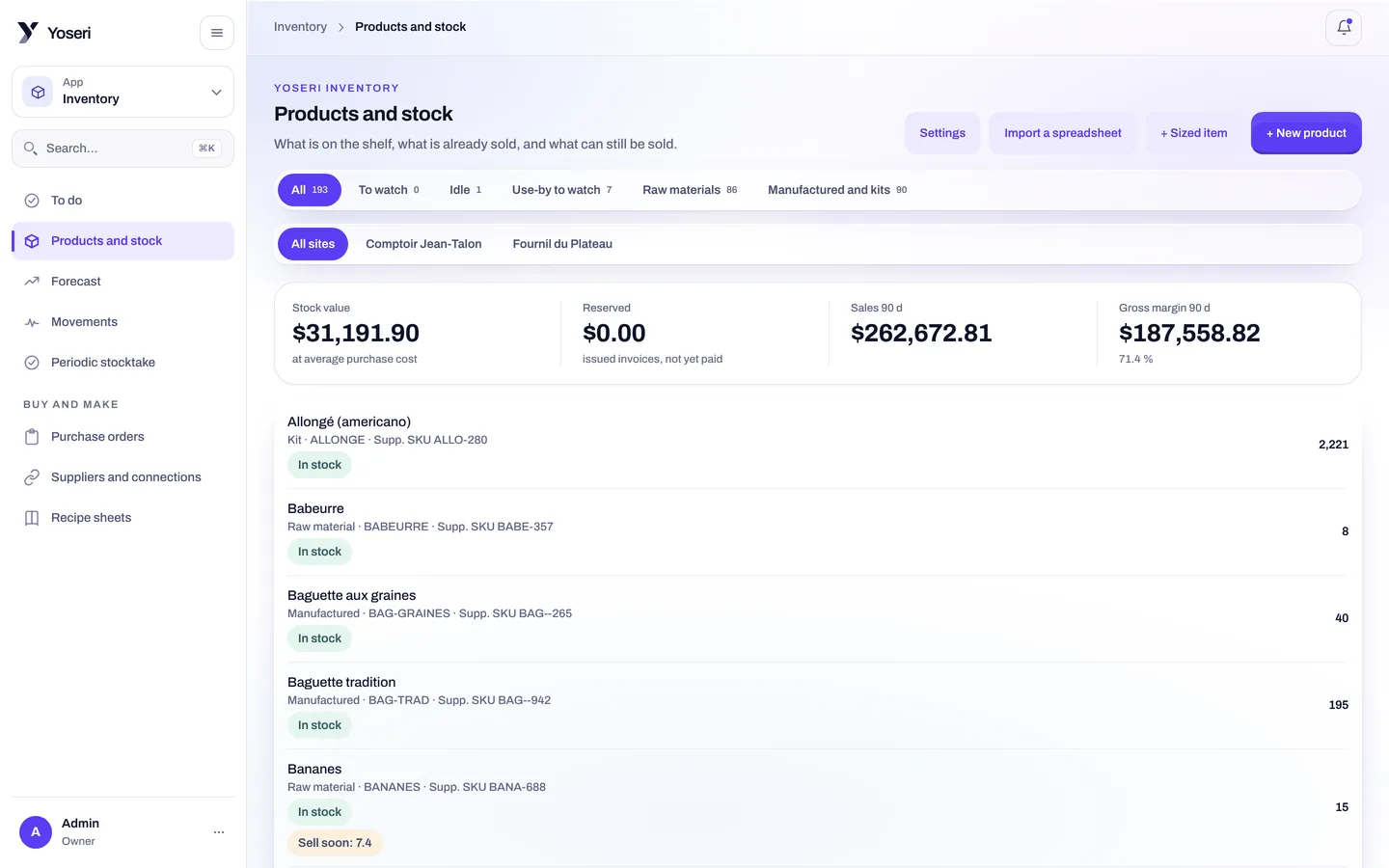
Actual and available
Two figures per item: what is on the shelf, and what is left once open orders are taken out.
Per shop, with transfers
Each shop has its own stock. A transfer leaves one shop and enters the other, traced in the movements.
Stock-out forecasts
At the pace of sales, the console tells you which item will run out, and when.
Periodic stock count
Stock count sessions per shop, then a validation that sets the quantities.
Items come from invoices, not from typing.
Import a supplier invoice as PDF, photo or CSV: items and suppliers that do not exist yet are created, cost prices are updated. A whole supplier catalogue loads from CSV.
- CSV import of items to start from an existing catalogue in a few minutes.
- Movements for every item: sales, receipts, transfers, losses, corrections, with who and when.
- Cost prices masked for anyone without the “see figures” capability. Absent, not zero.
Supplier invoices
PDF, photo or CSV. Each invoice creates what is missing and updates the prices.
CSV catalogues
The supplier’s catalogue, loaded in one go, ready for purchase orders.
EAN barcodes
Read with the phone or tablet camera, no scanner gun.
Lots and best-before dates
Set on receipt, followed until the sale or the loss.
Orders calculated, receipts scanned.
The automatic order starts from sales, planned production, accepted quotes and available stock. It proposes quantities per supplier; the purchase order then goes out by email.
- Receipt with the camera: every EAN barcode is scanned, with its lot and its best-before date.
- Three-way matching: ordered, received, invoiced. The variance shows before payment.
- The received invoice then moves to “to pay”, on the accounting side, with nothing retyped.
Whoever asks does not approve. Ever.
A purchase request goes through four steps, and the server checks at each one who has the right to act.
The request
A team member, a head of production or a buyer asks for an item, a quantity, a supplier.
The approval
Someone else, with the “approve requests” capability, approves or refuses. No one decides on their own.
The budget
The spend is charged to the period’s budget, visible to anyone with the “see figures” capability.
The purchase order
Emailed to the supplier, then expected at receipt and matched against the invoice.
Stock moves without anyone retyping it.
From the point of sale
Every sale deducts the item, or every ingredient of the recipe sold. The online page’s availability follows.
See the point of saleFrom production
The day’s ingredient needs come out of the recipes, with a draft purchase order in one click.
See productionTo the reports
Losses by reason, weighted average cost, sales per shop: the period’s summary, compared with the previous one.
See reportsQuestions about inventory and purchasing
How do I enter the catalogue to begin with?
Through a CSV import of the items, or by importing your supplier invoices as PDF, photo or CSV: each invoice creates the items and the supplier that are missing. Supplier catalogues also load from CSV, prices included.
Who can correct a quantity?
Only someone with the “adjust stock” capability, checked by the server: correcting a quantity, declaring a loss from the console, opening a stock count session or a count. At the bakehouse station, the evening loss stays open to any member of the sector, signed with their PIN.
Can a purchase request be approved by the person who made it?
No, never. The request goes to someone with the “approve requests” capability, who cannot decide on their own. It is then charged to the budget, and becomes a purchase order emailed to the supplier.
How is the automatic order calculated?
From sales, planned production, accepted quotes and available stock. It proposes quantities per supplier; you adjust, then the order goes out. On receipt, you scan EAN barcodes with the camera, with the lot and the best-before date.
Your catalogue in the console, today.
Items imported from CSV or from your invoices, first receipt scanned. Thirty days of trial, no card.