The terminal you already have, or your phone.
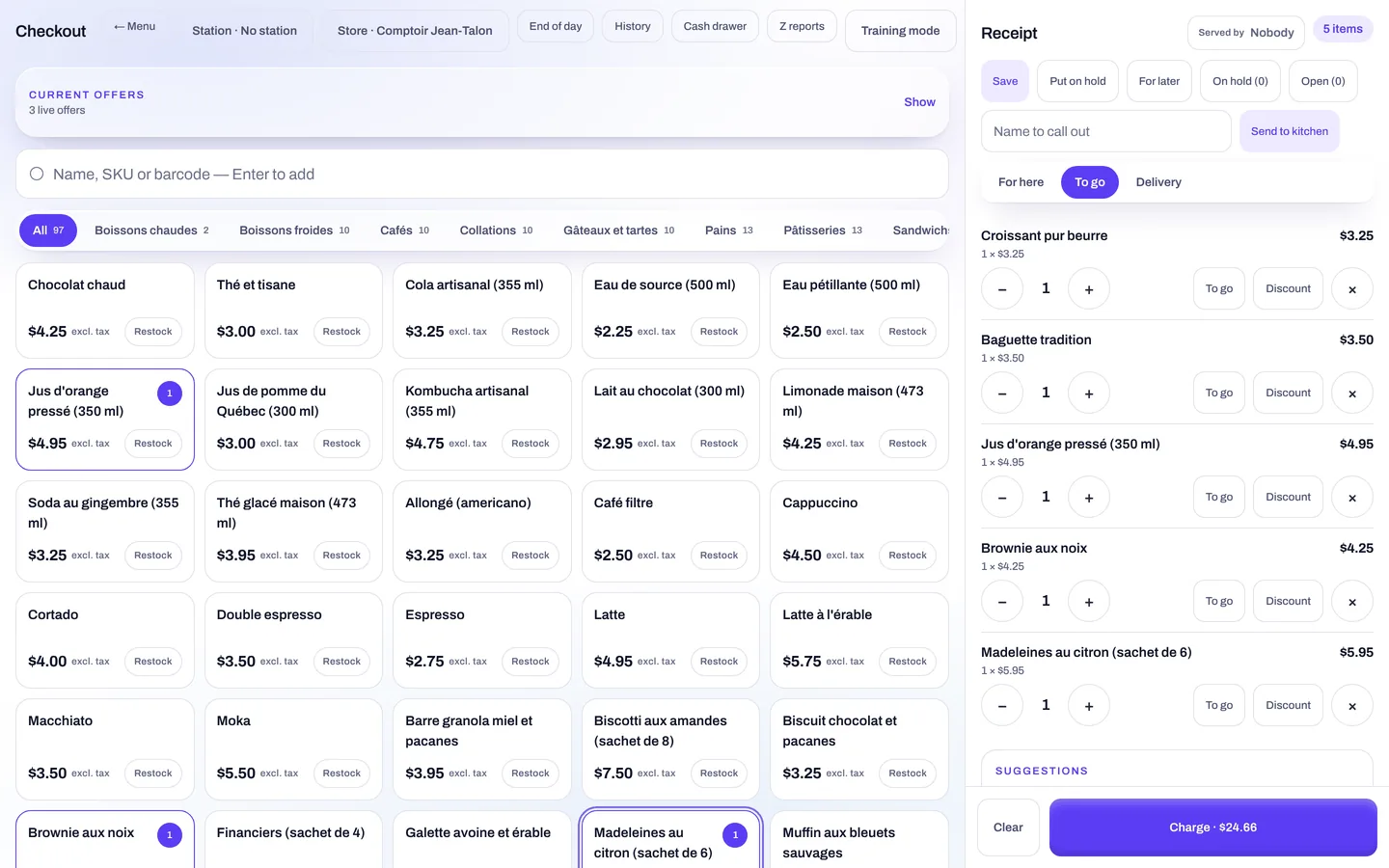
Yoseri sells no hardware. The console connects to Stripe, Square, Clover and Moneris terminals, drives Epson, Star and ESC/POS printers from the browser, reads barcodes with the camera, and turns a phone into a terminal with Tap to Pay.
Stripe Connect
A Standard account connected in one click, no secret key copied. The money lands in your account: register, online page, invoices by link.
Terminals
Stripe Terminal with Interac, Square Terminal, Clover (Pay Display), Moneris Go (Cloud). A simulator to train the team.
Tap to Pay
The phone or tablet takes the card, with no terminal. The native app is required.
Printers and drawer
Epson ePOS-Print, Star WebPRNT, ESC/POS over USB (WebUSB), system printing. The drawer opens through the printer.
The terminal reads the card. The screen types nothing.
The server recomputes every ticket, then the terminal takes over: it reads the card and returns the payment method and the reference. A payment sent twice is charged only once. The tip is offered at the register or left on the terminal, and a refund goes back to the card through the same terminal.
- Stripe Terminal with Interac, for Canada.
- Square Terminal, Clover Pay Display, Moneris Go: the terminal you have, connected from Settings.
- Tap to Pay: the phone or tablet as a terminal, with the native app. Enough to open without buying anything.
- Simulator: to train the team and test the screens without charging anyone.
Idempotent
A ticket sent twice, a single charge.
Read by the terminal
Payment method and card reference, never typed.
The browser drives the printer, the camera reads the barcode.
Nothing to install on a computer. Receipts, kitchen tickets and the drawer go through Epson ePOS-Print, Star WebPRNT or ESC/POS over USB thanks to WebUSB; otherwise, system printing. The receipt also goes out by email or SMS.
- Barcodes with the camera: BarcodeDetector when the browser offers it, ZXing otherwise. Receiving is scanned with the lot and the expiry date.
- Barcode scanner for a customer’s loyalty card at the counter.
- Kiosk tablets activated by a code: PIN time clock, section station, kitchen screen, customer screen. Never a price on display.
Messages, the Wallet, the bank.
Each service is plugged in where it belongs, and each has its setting in Settings.
SMS through Twilio
Reminders, receipts, campaigns. CASL consent checked, no marketing SMS between 9 p.m. and 9 a.m. Texts per use and per language, history, counter. $0.02 per segment.
Email through Resend
Receipts, invoices, reports, campaigns. Transactional emails are unlimited; 1,000 marketing emails a month without the option.
Apple Wallet and Google Wallet
The customer’s loyalty card in their phone, read with the barcode scanner or at the terminal.
Plaid
The bank connected for reconciliation, or statement import if you prefer.
WhatsApp through Meta
The company’s number for support and customers. Not in the Discovery plan.
External register
Sales from a Clover register are read in accounting: taxes by component, tips per employee.
A commission at the source, and nothing hidden.
Withheld by Stripe Connect, on top of Stripe fees. Marginal calculation: only what exceeds $50,000 in the month gets the reduced rate. Cash costs nothing.
| Per channel, per month | Discovery | Yoseri Business |
|---|---|---|
| At the register, up to $50,000 | 0.5% | 0.2% |
| At the register, beyond | 0.5% | 0.1% |
| Online, up to $50,000 | 1.5% | 0.5% |
| Online, beyond | 1.5% | 0.25% |
| Cash, gift cards, invoices settled offline | 0% | 0% |
| Stripe fees | extra | extra |
Questions about payments and hardware
Do I have to buy a terminal from Yoseri?
No. Yoseri neither sells nor rents any hardware. You connect the terminal you have: Stripe Terminal, Square Terminal, Clover (Pay Display) or Moneris Go. To start with nothing, Tap to Pay turns a phone or tablet into a terminal, with the native app.
Where does the money go?
Into your Stripe Connect account, a Standard account connected in one click from Settings, without copying any secret key. The register, the online page and invoices payable by link all pay into it directly. The Yoseri commission is withheld at the source and added to Stripe fees.
What happens if a payment is sent twice?
Nothing. Payments are idempotent: a ticket sent twice is charged only once. The payment method and the card reference are read by the terminal, never typed on screen.
Do I need to install a driver for the printer?
No. The browser drives Epson ePOS-Print, Star WebPRNT and ESC/POS over USB printers directly through WebUSB, or goes through system printing. The cash drawer opens through the printer.
How do I read a barcode?
With the camera, using BarcodeDetector when the browser offers it, otherwise ZXing: that is how receiving is done, with the lot and the expiry date. A barcode scanner reads a customer’s loyalty card at the counter.
Connect your terminal this afternoon. Or take payment with your phone.
Thirty days of trial with every app, no card and no hardware to buy.